


Weather & Radar - Storm radar
WetterOnline
I installed Weather & Radar - Storm radar because I wanted something more useful than a simple temperature number before leaving home. My usual weather routine is practical: check whether rain is moving toward me, decide what to wear, see if wind could affect a journey, and then look again before committing to outdoor plans. This app, developed by WetterOnline, is built around that kind of decision-making rather than a single daily forecast.
It is a free weather app for Android and iOS, with optional in-app purchases ranging from $0.99 to $8.99 per item. The basic appeal is easy to understand: local forecasts, weather alerts, rain, snow and wind radar, air-quality information, and a weather widget in one place. In my experience, the radar is the part that gives it a distinct identity, while the forecast pages make it practical for ordinary daily planning.
The app has been available since July 17, 2012, and its broad adoption is reflected in a 4.7 average from around 2.4 million ratings and more than 100 million installs. Those figures do not automatically make an app right for everyone, but they do suggest that Weather & Radar has become a familiar choice for people who want more detail than the default weather screen on a phone.
Related News
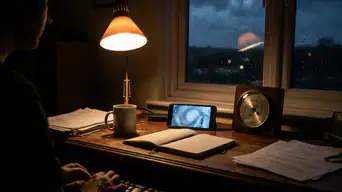
Stay Ahead of the Storm with Weather & Radar's Real-Time Tracking

Why Facebook's Mobile App Is More Vital Than Ever
From a quick morning check to a confident decision
The starting condition: what is happening near me?
My most useful test was not checking a forecast several days ahead. It was the ordinary morning question: can I walk to the station, cycle across town, or leave laundry outside without being caught by a sudden shower? A forecast icon can say “rain” without explaining whether that means a brief shower nearby or persistent rainfall during the exact period I care about. The radar view is intended to close that gap.
I start by looking at the local forecast, then move to the radar instead of treating the first screen as a final answer. That small change in habit matters. The forecast gives me the broad expectation, while the radar helps me judge what is already approaching and how the situation is developing. For a short trip, that combination is more useful than comparing several generic weather apps that all show the same symbol.
Related News

Instagram Is No Longer a Photo App. It Is an Attention Engine

Microsoft Teams Mobile: When Collaboration Becomes Navigation

How the NFL App Adapts to Android and iOS Updates

Temu: Elevate Your Shopping Experience to Billionaire Status

Why Traffic Rider Works Best as a Precision Reflex Game

How Google’s Find Hub Transforms Everyday Searches
The app also brings wind and snow into the same workflow. That is valuable when rain is not the main concern. Strong wind can change whether a bike ride feels sensible, while snow radar can be more relevant than a temperature reading when roads or paths may become difficult. Air-quality information adds another layer for people who plan exercise outdoors or are sensitive to poor conditions.
Step one: set the question before opening the map
I get better results when I decide what I am trying to find out first. “Will it rain today?” is too broad. “Will rain reach my route during the next part of my journey?” is a question the radar can help me investigate. This prevents the common mistake of staring at a moving map without knowing what decision it is supposed to support.
For a commute, I check the forecast for the destination and then inspect the radar around the departure window. For a walk, I pay more attention to nearby movement than to the rest of the day. For outdoor work, I look at rain and wind together, because a dry interval may still be uncomfortable or unsafe if gusts are the real problem.
Gallery
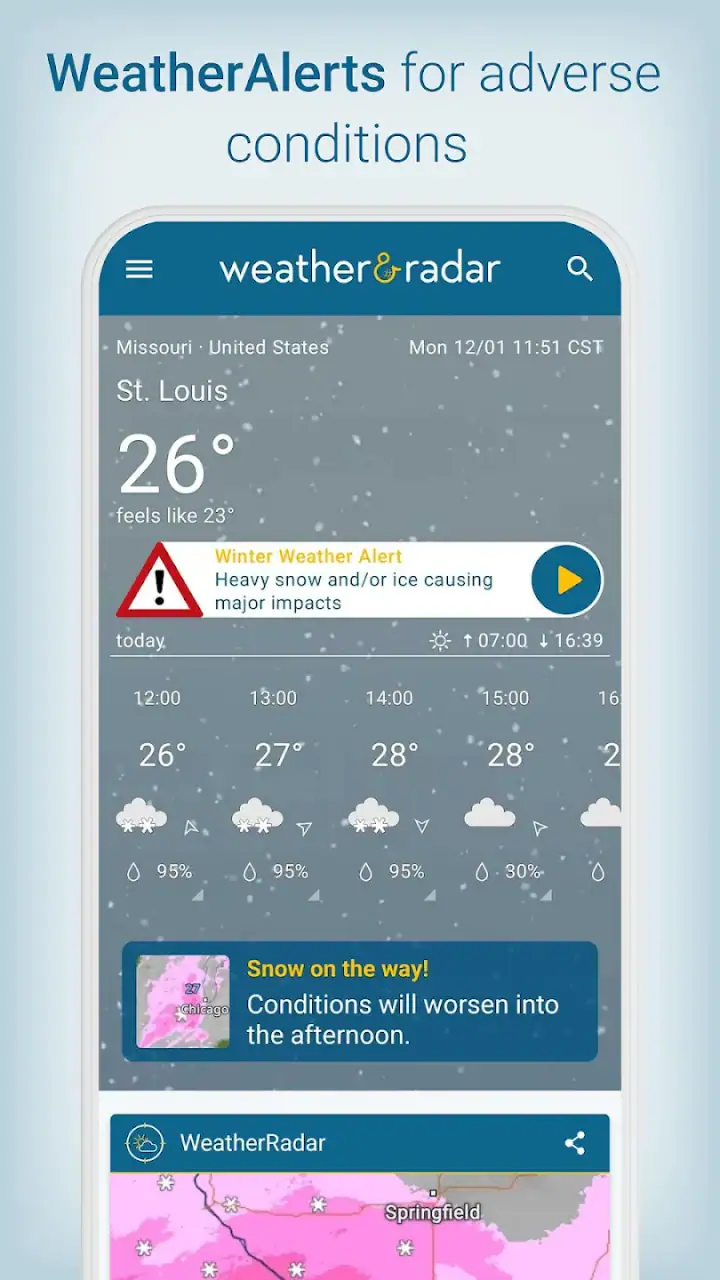
This is one of the app’s strongest practical qualities: it encourages a location-and-time workflow. Instead of asking me to trust a single daily label, it lets me connect a forecast with a visible weather pattern. The result is not perfect certainty, but it is a more informed choice.
Step two: use radar as a decision tool, not decoration
Radar maps can be visually impressive but not always useful. I found that the map becomes worthwhile when I use it to answer a narrow question and then stop. If a band of rain is already close, I can decide whether to wait, take an umbrella, or change my route. If the pattern is moving away, I may accept a short delay rather than canceling a plan.
The same approach works for snow. A general forecast may indicate wintry conditions, but the radar view helps me see whether the relevant area is actually being affected at the moment I need to travel. I would still check local road information for serious conditions, but the app provides a helpful first screen before I make that handoff.
Wind radar is useful in a different way. Rain is easy to imagine on a map; wind is less visible in daily life until it affects a bridge crossing, an exposed path, or a planned outdoor activity. Looking at wind alongside the ordinary forecast helps me avoid a narrow interpretation of “dry weather.” Dry does not necessarily mean pleasant, and the app makes that distinction easier to consider.
Step three: compare the map with the forecast
I would not use the radar alone to plan an entire day. A moving weather pattern can inform the next decision, but it does not replace the broader local forecast. I use the forecast for the general shape of the day and the radar for immediate timing. That division of labor is more reliable than expecting either view to do everything.
This also answers an important question for new users: is the app suitable for longer-range planning? Yes, for getting an overview, but its most convincing value appears when the decision is close in time and location. If I am planning a trip well in advance, I treat the forecast as provisional and return later to inspect radar conditions before leaving.
The widget can make this routine quicker by putting weather information where I already look on the phone. I see it as a shortcut, not a replacement for opening the app. A widget is convenient for a glance, but radar and air-quality context require a fuller view. Users who dislike checking a separate weather app may appreciate that reduced friction, while people who want only a notification may find the broader interface more than they need.
The handoff: turning weather information into action
A good weather app does not finish the job when it displays a map. The real outcome comes when the information is handed off to another decision: leave now, wait ten minutes, carry waterproof clothing, move exercise indoors, or warn someone that a journey may take longer. Weather & Radar works best when I treat it as the first stage of that process.
For example, imagine I am preparing to walk to work. I check the local forecast and see unsettled conditions. I open the rain radar and look at the area between home and the workplace rather than focusing only on the starting point. If rain is close, I check wind as well, because an umbrella may be a poor solution in exposed streets. I then choose between leaving immediately, waiting, or taking public transport. The app has not made the decision for me, but it has made the trade-off clearer.
For a parent taking children to a park, the handoff is slightly different. A short dry interval may be enough for a visit, but air quality could change the decision for someone with respiratory sensitivity. In that situation, the weather view and air-quality information belong together. I would still use personal judgement and local guidance, but having both factors in one app is more convenient than switching between unrelated sources.
For travel, I use the app as a departure check rather than a complete travel authority. It can help me understand local rain, snow, wind, and air conditions at the places I care about, but transport operators and official warnings remain more appropriate for disruptions, closures, and serious hazards. This is a key boundary: Weather & Radar supports planning, while official channels should handle urgent public-safety information.
Where it feels better than a basic weather app
The usual alternative is the weather screen already included with a phone. That option is often faster for a temperature glance, and it may be enough for someone who only wants the current condition and a simple daily outlook. Weather & Radar earns its space by adding a more visual, location-focused workflow around precipitation, snow, and wind.
Compared with a simple forecast app, the radar gives me more control over short-term decisions. Compared with a dedicated air-quality app, the advantage is convenience: I can consider air conditions alongside weather without changing tools. Compared with a specialist storm service, however, this app may feel less focused if all I want is highly technical analysis or severe-weather monitoring. Its strength is the balance between accessible everyday information and richer map-based context.
The developer’s long presence in the weather category also shows in the app’s broad scope. It is not designed around one narrow audience such as pilots, sailors, or professional meteorologists. That makes it approachable, but it also means advanced users may want more specialized tools for technical forecasting, historical analysis, or operational decisions.
Small workflow improvements that make a difference
My first tip is to check the radar at the moment you are about to leave, not only when you wake up. Weather can change enough during a morning that an early glance becomes stale. A second tip is to inspect the destination as well as the current location. A dry starting point can create false confidence if the other end of the journey is under a rain band.
My third tip is to pair the widget with a deliberate radar check. The widget is useful for reducing the number of taps needed for routine awareness, but it should not become an automatic verdict. When the widget suggests unsettled weather, opening the map gives the information needed to decide whether the problem is immediate, distant, or likely to pass.
A fourth useful habit is to treat air quality as a separate decision factor instead of assuming that pleasant weather means healthy outdoor conditions. This is particularly relevant before running, cycling, or taking children outside. The combined view helps me remember that temperature and rainfall are not the only things that affect comfort.
Finally, I avoid interpreting a radar image with excessive precision. A map can show movement and proximity, but it cannot guarantee exactly what will happen on one street at one minute. I use it to improve timing and preparation, not to promise a completely dry route.
Where the flow breaks
The app is not frictionless. A weather map can feel busy when I only want a quick answer, and the amount of information may be unnecessary for someone who checks the temperature once a day. The richer the screen becomes, the more important it is to know which layer matters for the decision in front of me.
There is also a natural limit to short-term weather prediction. Radar is most helpful when I am looking at nearby conditions, but it should not be treated as a guarantee for a distant plan. For longer journeys, rapidly changing weather, or serious storms, I would combine it with official alerts and local information rather than relying on one consumer app.
The free model is another consideration. The app is free to download and use, while optional purchases are available. That arrangement may suit people who want to begin without paying, but users who dislike any in-app purchase prompts should pay attention to how the app presents optional extras during use. I would not choose this app solely because it is free; I would choose it because the radar and layered information are relevant to my routine.
The minimum operating-system requirement is Android 10, so owners of older Android devices should check compatibility before planning around it. On supported devices, the app is aimed at general audiences and carries an Everyone age rating, which fits its everyday subject matter. Families can use it for planning, although weather decisions involving children should still account for individual needs rather than relying on a color or icon.
Who should use it, and who should skip it?
I recommend Weather & Radar to commuters, cyclists, walkers, parents, travelers, and anyone whose plans are easily disrupted by a passing shower or strong wind. It is especially useful if you regularly ask whether weather is approaching now, rather than merely wondering what the day’s headline forecast says. People who care about air quality also gain from having that information alongside the weather view.
I would skip it if I want only a minimal temperature display, if I never use maps, or if I need a specialist meteorological workstation. A basic built-in weather tool may be quicker for a one-second glance. A dedicated professional service may be better for technical forecasting or high-stakes operations. Weather & Radar sits between those extremes: more informative than a basic widget, but easier to approach than a specialist system.
The result after using it as a complete routine
After using the app as a sequence rather than a collection of screens, I found its value easier to judge. I begin with a local question, check the general forecast, inspect radar for timing, compare rain or snow with wind, consider air quality when relevant, and then hand the result to a real-world choice. That workflow is more useful than simply opening the app and browsing weather graphics.
My overall impression is positive because the app connects immediate conditions with practical action. The radar is the feature that most clearly separates it from a standard forecast, while the widget and air-quality information make repeated daily checks easier. The limitations are mostly about interpretation and scope: no weather map should be treated as absolute certainty, and the broad interface may be excessive for people who want only a simple forecast.
For me, the best reason to install it is straightforward: it helps turn “what is the weather doing?” into “what should I do next?” If that is the question you ask before commuting, exercising, traveling, or arranging outdoor plans, Weather & Radar is a capable free option from WetterOnline. I would keep official warnings and specialist sources in the loop for serious situations, but for everyday timing and preparation, it has earned a place in my regular weather routine.
FAQs for Weather & Radar - Storm radar
What features does Weather & Radar - Storm Radar offer?
Weather & Radar - Storm Radar provides real-time weather forecasts, detailed storm tracking, and radar images. It includes features like hourly and daily forecasts, extreme weather alerts, and information on wind speed, precipitation, and temperature. Additionally, users can access satellite images and customize alerts for specific weather conditions.
Is Weather & Radar - Storm Radar available for free?
Yes, Weather & Radar - Storm Radar offers a free version with basic features. However, to access premium features such as ad-free usage, extended forecast information, and advanced radar data, a subscription is required. The app provides various subscription plans to cater to different user needs.
How accurate are the weather forecasts in the app?
The app is known for its high accuracy, using data from reliable sources and advanced algorithms to provide precise weather forecasts. It updates regularly to reflect the most current conditions. However, as with any weather service, forecasts are predictions and may occasionally change due to unforeseen meteorological events.
Can I customize alerts in Weather & Radar - Storm Radar?
Yes, the app allows users to customize alerts based on their preferences. You can set notifications for specific weather conditions such as thunderstorms, heavy rain, or heatwaves. This feature ensures that users receive timely alerts relevant to their location and personal safety needs.
Does Weather & Radar - Storm Radar require an internet connection?
Yes, an internet connection is necessary for the app to update weather forecasts and radar images in real-time. While some features may cache data for offline use, accessing the most current weather conditions and alerts requires a stable internet connection to ensure accuracy and reliability.
Pros
- Accurate weather forecasts with real-time updates.
- Detailed radar maps for better storm tracking.
- Customizable alerts for severe weather conditions.
- User-friendly interface with intuitive navigation.
- Global coverage with localized weather information.
Cons
- Frequent ads can disrupt user experience.
- Some features require a premium subscription.
- Battery consumption can be high with constant updates.
- Radar maps may lag on older devices.
- Limited offline functionality for remote areas.


